

Hauling gear down a dirt trail or cruising the highway in your Nissan Frontier and suddenly seeing a strange light flashing on your dashboard? Your stomach drops. Is it serious? Can you make it to your destination or should you pull over right now? Those Nissan dashboard warning lights can seem cryptic, but they’re your pickup’s early warning system. In this guide, we’ll break down Nissan dashboard symbols and meanings by color on your Frontier. We’ll cover what it means, how serious it is, and exactly what to do next. Think of it as your complete cheat sheet for keeping your Frontier running strong and safely on the job site, the trail, or the open road.
Nissan Dashboard Symbols and Meanings: What Are They Telling You?
For Frontier owners, dashboard warning lights aren’t just random symbols. They’re your truck’s way of talking to you. Ignore the wrong one, and a small issue can snowball into a costly repair. Panic over the wrong one, and you’ve pulled over for nothing.
Nissan Dashboard Symbols by Color
Your Nissan Frontier is smarter than ever. The newly added sensors can watch what’s going on and send you a message in the form of dashboard lights of different colors. Red lights mean something serious and you should address it immediately; Yellow or Orange lights mean something requires attention; Green or blue lights are informative and there is no need to worry. The key is knowing which light means what and when to act. Read on for more.
Common Nissan Dashboard Symbols and Meanings by Color
Nissan Red Indicators
The occurrence of the following red Nissan dashboard warning lights is required to be addressed immediately.
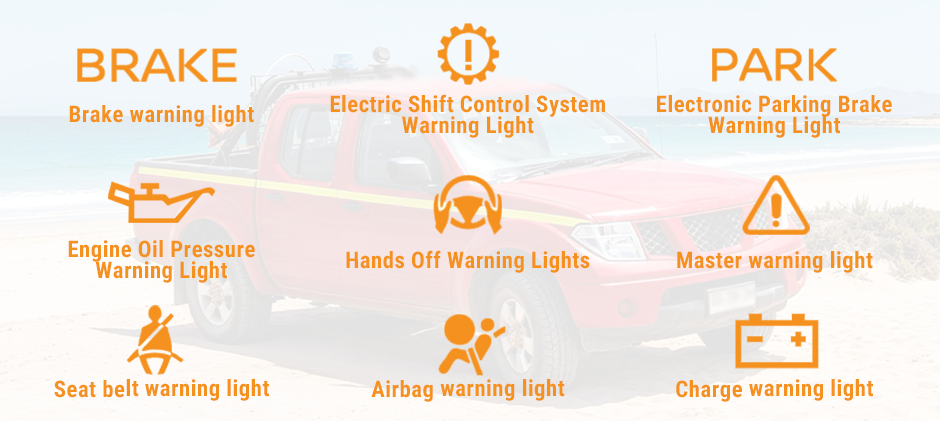
#1 Brake warning light
What it means: This light can indicate two different situations. First, it comes on when the parking brake is applied with the ignition in the ON position — this is normal. Second, if the parking brake is fully released and this light remains on, it warns of a low brake fluid level, which can compromise your braking ability.
What to do: First, ensure the parking brake is fully released. If the light remains on, check the brake fluid level immediately. If the fluid is low, top it off and have the system inspected for possible leaks. Do not drive if you suspect a brake system issue.
#2 Electric Shift Control System Warning Light
What it means: This light illuminates and a chime sounds when a malfunction is detected in the electric shift control system. If the chime sounds continuously when the ignition is placed in the OFF position, this also indicates a system fault.
What to do: Do not attempt to diagnose or repair this system yourself. Have the machinery inspected by a dealer or authorized repair shop as soon as possible.
#3 Electronic Parking Brake Warning Light
What it means: This light illuminates when the electronic parking brake system is engaged. When the engine is started and the parking brake is released, the light should turn off. If the red warning light illuminates or flashes alongside the yellow electronic parking brake warning light, it may indicate a system malfunction.
What to do: Always confirm this light has turned off before driving. If the light illuminates or flashes during normal driving or appears alongside the yellow warning light, stop driving and have the system inspected.
#4 Engine Oil Pressure Light
What it means: This light warns of low engine oil pressure. Continuing to drive can cause severe engine damage within minutes.
What to do: Pull off the road in a safe area and stop the engine immediately. Call an authorized repair shop or dealer.
#5 Hands Off Warning Lights
What it means: This light illuminates when the driver removes their hands from the steering wheel for an extended period while the Steering Assist feature is active.
What to do: Return your hands to the steering wheel immediately. If the driver remains unresponsive after the light illuminates, the system will escalate its warning in the following sequence:
- The light flashes and an audible alert sounds
- A brief brake application is applied
- If still unresponsive, the hazard lights activate and the vehicle slows to a complete stop
#6 Master warning light
What it means: This light illuminates when one or more items require your immediate attention. It does not indicate a specific fault on its own — instead, it directs you to check the vehicle information display for details on what needs attention.
What to do: Check the vehicle information display to identify the specific warning message. The warning will remain on the display until the issue is addressed or the ignition is turned off.
#7 Seat belt warning light
What it means: This light illuminates and a chime sounds to remind the driver and front passenger to fasten their seat belts. It is a safety reminder, not a mechanical fault.
What to do: Fasten all seat belts before driving. The light and chime will turn off once the belts are secured.
#8 Airbag warning light
What it means: When the ignition is placed in the ON or START position, this light illuminates for approximately 7 seconds, then turns off — this is normal system self-check behavior. If the light stays on, flashes intermittently, or does not come on at all, there may be a malfunction in the airbag or seat belt pretensioner system.
What to do: If any of the following occur, have the system inspected immediately:
- The light remains on after 7 seconds
- The light flashes intermittently while driving
- The light does not come on at all during startup
#9 Charge warning light
What it means: It may indicate the charging system is not functioning properly while the engine is running. Your battery may not be receiving a charge, which can cause an unexpected shutdown.
What to do: Turn the engine off and check the alternator belt. If the belt is loose, broken, or missing, or if the light remains on, have the system checked by the dealer.
Nissan Yellow/Orange Indicators
Yellow or orange Nissan dashboard warning lights require prompt attention before it escalates into a bigger problem.
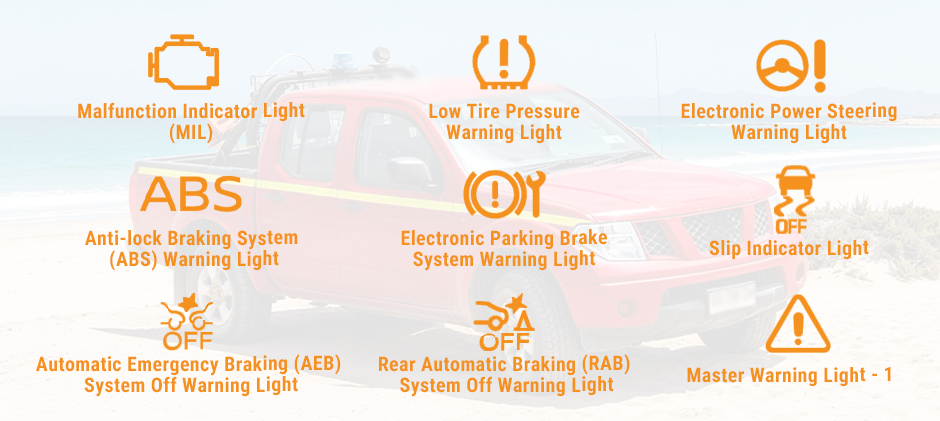
#1 Malfunction Indicator Light (MIL)
What it means: This light indicates a potential emission control malfunction if the light comes on steadily or blinks while the engine is running.
What to do: If the light is steady, first check that the fuel filler cap is not loose or missing, as this is a common cause. After a few normal driving trips, the light should turn off if no further fault exists. If it remains on, have the system inspected at a Nissan dealer. If the light is blinking, reduce your speed and engine load immediately and have the vehicle inspected as soon as possible. Do not ignore a blinking MIL.
#2 Low Tire Pressure Warning Light
What it means: This light warns of low tire pressure in one or more tires, or indicates a malfunction in the Tire
Pressure Monitoring System (TPMS). If the light stays on continuously, one or more tires have low pressure. If the light flashes for approximately one minute before remaining on, the TPMS itself may not be functioning properly.
What to do: If the light is on continuously, stop driving and check the pressure of all four tires. Inflate them to the recommended level shown on the tire placard located on the driver’s door jamb. If the light flashes before remaining on, have the TPMS inspected by a Nissan dealer.
#3 Electronic Power Steering Warning Light
What it means: When the ignition is turned to the ON position, this light illuminates briefly and then turns off after the engine starts — this is normal. If the light remains on while the engine is running, it may indicate that the electric power steering system is not functioning properly.
What to do: If this light comes on while driving, be aware that there will be no power steering assist. You will still have full control of the vehicle, but steering will feel significantly heavier than normal. Drive carefully at a reduced speed and have the vehicle inspected by a Nissan dealer as soon as possible.
#4 Anti-lock Braking System (ABS) Warning Light
What it means: When the ignition is turned to the ON position, this light illuminates briefly and then turns off. This indicates the ABS is operational. If the light remains on while the engine is running or during driving, it may indicate the ABS is not functioning properly. When an ABS fault occurs, the anti-lock function is disabled, but the standard brake system continues to operate normally without anti-lock assistance.
What to do: If this light comes on while driving, your regular brakes are still operational and you are not in immediate danger. However, during emergency braking, your wheels may lock up without ABS assistance. Drive carefully and have the system inspected promptly by a Nissan dealer.
#5 Electronic Parking Brake System Warning Light
What it means: This warning light functions for the electronic parking brake system. If it illuminates, it may indicate that the electronic parking brake system is not functioning correctly.
What to do: Have the system inspected by a Nissan dealer as soon as possible. Do not rely on the electronic parking brake until the system has been confirmed operational.
#6 Slip Indicator Light
What it means: The light blinks during normal driving to alert you that the road surface is slippery and the Vehicle Dynamic Control (VDC) system is actively working to maintain traction and stability. When the ignition is first turned to the ON position, the light also illuminates briefly as part of the system self-check, then turns off if the system is operational.
What to do: If the light does not come on, have the system checked. It is recommended that you visit a Nissan dealer for this service.
#7 Automatic Emergency Braking (AEB) System Off Warning Light
What it means: This light illuminates when the AEB system has been manually turned off in the vehicle information display. If the light illuminates while the AEB system is set to ON, it may indicate the system is temporarily unavailable due to a sensor obstruction or fault.
What to do: If the light appears while the system is active, stop the vehicle in a safe location, shift to P (Park), and turn the engine off. Check that the front sensor area is clean and free from dirt, ice, or debris. Restart the engine. If the light remains on and a warning message appears on the display, have the system inspected by a Nissan dealer.
#8 Rear Automatic Braking (RAB) System Off Warning Light
What it means: This light illuminates when the RAB system has been turned off in the vehicle information display. If the light illuminates while the RAB system is set to ON, it may indicate the system is temporarily unavailable.
What to do: Confirm the RAB system is enabled in the vehicle information display. If the light remains on while the system is active, have the vehicle inspected by a Nissan dealer.
#9 Master Warning Light
What it means: This light illuminates when one or more items require your attention. It does not identify a specific issue on its own — it directs you to check the vehicle information display for the specific warning details.
What to do: Use the steering wheel buttons to navigate to the “Warnings” screen on the vehicle information display if the message is not immediately visible. Address the identified warning accordingly. The warning will remain on the display until the issue is resolved or the ignition is turned off. See full guide on Master Warning Light Nissan: What It Means and How to Respond here.
Nissan Green/Blue Indicators
Green or blue warning lights on your Nissan Frontier signify normal operation.
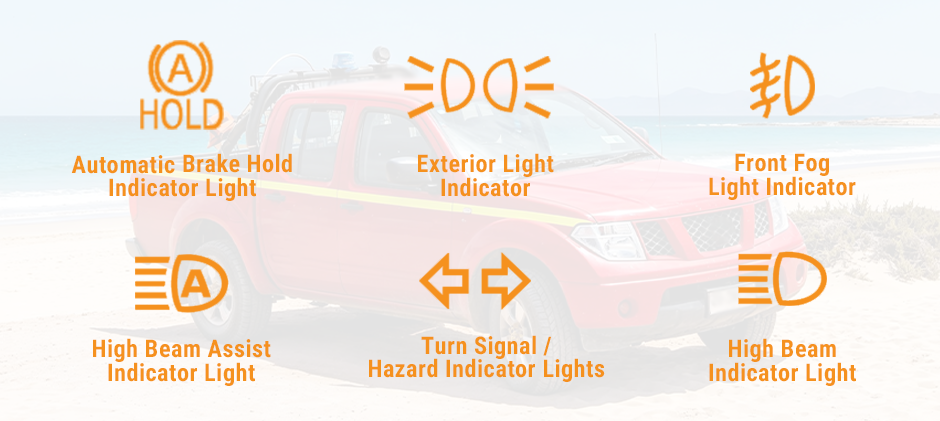
#1 Automatic Brake Hold Indicator Light
What it means: This indicator light has two colors to communicate the current state of the automatic brake hold system. When the light is white, the system is on standby — it is enabled and ready to activate but is not currently holding the brakes. When the light is green, the system is actively engaged and is holding the brakes for you, such as when stopped at a traffic light.
What to do: No action is required. This light is purely informational. When the system is actively holding (green), the brakes will release automatically once you press the accelerator pedal to move off.
#2 Exterior Light Indicator
What it means: This indicator light illuminates when the exterior lights are active — specifically when the side marker lights or headlights have been selected. It confirms that the vehicle’s exterior lighting is on.
What to do: No action is required. This light simply confirms your exterior lights are on. If this light is on when you did not intend to activate the lights, check your headlight switch position.
#3 Front Fog Light Indicator
What it means: This indicator illuminates when the front fog lights are currently on. Front fog lights are typically used in low-visibility conditions such as heavy fog, rain, or snow.
What to do: No action is required. Be aware that fog lights should generally only be used in low-visibility conditions — using them in normal conditions can dazzle other drivers. Turn them off when visibility improves.
#4 High Beam Assist Indicator Light
What it means: This indicator illuminates when the headlight switch is set to the AUTO position with high beams selected and the High Beam Assist system is operational. The system automatically switches between high and low beams based on detected oncoming traffic and ambient lighting conditions.
What to do: No action is required. The system will automatically manage your high beams. If you prefer to control high beams manually, you can switch the headlight switch out of AUTO mode.
#5 Turn Signal / Hazard Indicator Lights
What it means: The left or right indicator flashes when the corresponding turn signal switch is activated, confirming the turn signal is operating. Both indicators flash simultaneously when the hazard switch is turned on, signaling a hazard or emergency stop to other road users.
What to do: No action is required — these lights simply confirm your signals are working. If a turn signal flashes unusually fast (rapid blinking), this may indicate that a turn signal bulb has failed and should be replaced.
#6 High Beam Indicator Light
What it means: This indicator illuminates when the headlight high beams are active and turns off when low beams are selected. It provides a clear, at-a-glance confirmation of which beam setting is currently in use.
What to do: No action is required. This light is a simple status reminder. When approaching oncoming traffic or driving in well-lit areas, switch to low beams as a courtesy and for safety.
*Sourced from Nissanusa.com. Always consult your owner’s manual before you perform any actions and seek professional help when necessary.
Closing
Understanding the Nissan dashboard symbols and meanings is essential. Your dashboard is Frontier’s way of talking to you. Whether you’re hauling a full payload down a job site road or putting miles behind you on the interstate, the difference between a minor fix and a major repair often comes down to one thing: how quickly you respond. Red means act now. Yellow means don’t wait. Green and blue mean everything’s working as it should. When in doubt, don’t ignore it. A quick trip to your Nissan dealer today is almost always cheaper than the repair bill tomorrow. Always consult your Owner’s Manual for complete information. Features may vary by model year and trim level. FridayParts offers a vast selection of high-quality replacement parts for various Nissan models. Also, you can stay tuned to our blogs for more information.
